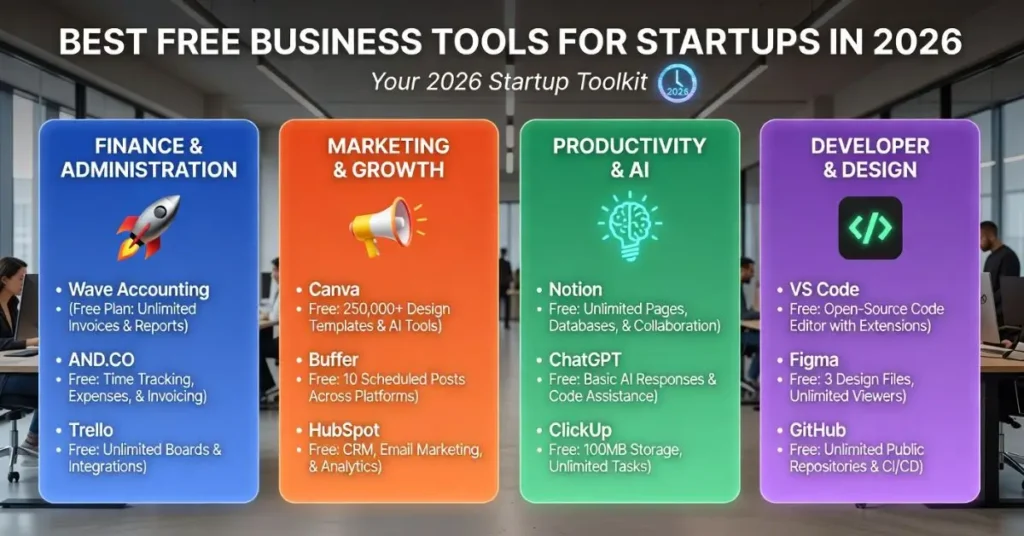

Starting a business is expensive enough. The last thing you need is to spend thousands of dollars on software before you’ve made your first sale.
The good news is that some of the most powerful business tools in the world offer genuinely useful free plans, not just watered-down trials. The problem is knowing which ones are actually worth your time and which ones will hit you with a paywall the moment you try to do anything meaningful.
This guide cuts through the noise. You’ll find the best free business tools for startups organized by category, with honest notes on what each tool does well and where its free plan runs out.
Free business tools for startups are software platforms that offer core features at no cost, allowing early-stage businesses to manage operations, communicate, collaborate, and grow without upfront software investment. Most operate on a freemium model, meaning basic features stay free while advanced features require a paid upgrade.
Quick Summary
There are genuinely useful free tools for every part of your startup — from project management and communication to design and accounting. This guide covers the best ones by category so you can build a solid tech stack without spending a dollar.
Why the Right Tools Matter Early On
Most startups fail not because of bad ideas, but because of poor execution. Disorganized teams, missed deadlines, lost files, and slow communication are all things the right tools can prevent.
When you’re working with a small team and a tight budget, every hour counts. A good project management tool can save your team hours of back-and-forth every week. A free invoicing tool can help you get paid faster. A reliable communication platform keeps everyone on the same page without endless email chains.
Getting your tool stack right early also builds good habits. As your startup grows, upgrading to paid plans becomes a natural next step — not a painful switch from chaos.
Project Management and Organization
Trello
Trello is one of the most beginner-friendly project management tools available. It uses a simple board-and-card system where you can create tasks, assign them to team members, set deadlines, and track progress visually.
The free plan supports unlimited cards, up to 10 boards per workspace, and basic automation. For a small startup team managing multiple projects, this is more than enough to stay organized.
A two-person SaaS startup in Austin, Texas could use Trello to manage their product roadmap, content calendar, and client feedback all in one place — for free.
Notion
Notion goes beyond task management. It’s a workspace where you can write documents, build databases, create wikis, and manage projects — all in one place.
The free plan is generous for individuals and small teams. Startups use it to document processes, store meeting notes, build internal knowledge bases, and manage lightweight project tracking.
Communication and Team Collaboration
Slack
Slack is the go-to communication tool for startups and remote teams. It organizes conversations into channels by topic, project, or department — keeping things far more organized than email.
The free plan gives you access to 90 days of message history and up to 10 integrations with other apps. For early-stage startups, this is usually plenty to keep communication running smoothly.
Google Meet
For video calls and team meetings, Google Meet offers free unlimited one-on-one calls and group meetings up to 60 minutes. It works directly in your browser — no downloads needed.
If your startup already uses Gmail or Google Workspace, Meet is already built in. It’s reliable, simple, and widely accepted by clients and partners.
File Storage and Document Collaboration
Google Drive
Google Drive gives every user 15GB of free cloud storage and access to Google Docs, Sheets, and Slides. For startups, this is often all the document infrastructure they need in the early months.
Multiple team members can work on the same document at the same time, leave comments, and track changes. It removes the need for emailing files back and forth — which is slow, messy, and creates version control nightmares.
Dropbox
Dropbox offers 2GB of free storage, which is limited for heavy file users but useful for sharing specific documents or folders with clients and partners. It integrates well with most other tools startups already use.
Design and Visual Content
Canva
Canva’s free plan is one of the most valuable tools on this entire list. It gives startups access to thousands of templates for social media posts, presentations, pitch decks, logos, and more — no design skills required.
Small teams can create professional-looking content without hiring a graphic designer. For early-stage startups managing their own marketing, this tool alone saves hundreds of dollars a month.
Figma
If your startup is building a digital product, Figma is the industry standard for UI/UX design. The free plan allows up to 3 projects and unlimited personal files. Designers, developers, and product managers can all collaborate in real time on the same design file.
Finance, Invoicing, and Accounting
Wave
Wave is one of the few genuinely free accounting tools built specifically for small businesses and startups. It offers invoicing, expense tracking, receipt scanning, and basic financial reports — all completely free.
There’s no time limit and no feature wall behind a paywall for the core accounting functions. For a freelancer or early-stage startup managing simple finances, Wave is a strong choice.
PayPal Invoicing
If you need to send invoices and get paid quickly, PayPal’s free invoicing tool is fast and familiar to most clients. There’s no monthly fee — PayPal only charges a transaction fee when you receive a payment.
Email Marketing
Mailchimp
Mailchimp’s free plan allows up to 500 contacts and 1,000 email sends per month. For a startup just building its email list, this is a solid starting point.
You can create basic email campaigns, set up a simple welcome email sequence, and track open rates and clicks — all without paying anything. Once your list grows, you’ll need to upgrade, but the free tier buys you real time to build momentum.
Brevo (formerly Sendinblue)
Brevo’s free plan allows up to 300 emails per day with no contact limit. This makes it a better starting choice than Mailchimp if you have a larger contact list but send emails less frequently.
A Quick Comparison of Key Free Tools
| Category | Tool | Free Plan Limit | Best For |
|---|---|---|---|
| Project Management | Trello | 10 boards | Small teams, visual planners |
| All-in-One Workspace | Notion | Limited blocks | Docs, wikis, lightweight PM |
| Communication | Slack | 90 days history | Remote teams, async work |
| Video Calls | Google Meet | 60-min group calls | Client meetings, team calls |
| File Storage | Google Drive | 15GB | Docs, collaboration |
| Design | Canva | Thousands of templates | Marketing, social media |
| Accounting | Wave | Fully free core features | Invoicing, expense tracking |
| Email Marketing | Mailchimp | 500 contacts | List building, campaigns |
Building Your Startup Tool Stack
The smartest approach is not to sign up for every tool on this list. Pick one tool per category based on your current biggest need, learn it well, and add more only when you have a clear reason.
A simple starter stack for most early-stage startups might look like this:
- Trello or Notion for project management
- Slack for team communication
- Google Drive for file storage and documents
- Canva for design
- Wave for invoicing and accounting
- Mailchimp for email marketing
That’s a complete operational foundation. And it costs nothing.
Honest Limitations to Keep in Mind
Free plans are great for getting started, but they do have real limits. Here’s what to watch out for:
Storage caps. Google Drive’s 15GB fills up fast if you store large files or videos. Plan for this early.
User limits. Many free plans restrict the number of team members or seats. As your team grows, costs will appear.
Feature walls. Some tools save their most useful features for paid tiers — like advanced automation in Trello or detailed analytics in Mailchimp.
Branding. Some free tools add their own branding to your emails or documents. For client-facing work, this can look unprofessional.
None of these are dealbreakers when you’re starting out. Just go in with realistic expectations and upgrade when it genuinely makes business sense.
Conclusion
The best free business tools for startups give you everything you need to build a solid foundation — without touching your budget. Project management, communication, design, accounting, and email marketing are all covered by free tools that real businesses use every day.
Start simple. Pick the tools that solve your biggest current problems. Build good habits around them. And upgrade only when the free plan genuinely holds you back.
The tools are ready. The only question is whether you are.
Frequently Asked Questions
What are the best free business tools for startups?
The best free business tools for startups include Trello or Notion for project management, Slack for communication, Google Drive for file storage, Canva for design, Wave for accounting, and Mailchimp for email marketing. Together, these tools cover most of what an early-stage startup needs to operate efficiently without any upfront cost.
Are free business tools really good enough for startups?
Yes, for most early-stage startups, free tools are more than sufficient. Tools like Google Drive, Canva, and Wave offer professional-grade features at no cost. As your team grows and needs become more complex, upgrading specific tools to paid plans makes sense — but the free versions can take you further than most people expect.
What is the best free project management tool for startups?
Trello is the best free project management tool for most startups because of its simple visual interface and generous free plan. Notion is a strong alternative if you need more flexibility, including document creation and knowledge management alongside task tracking. Both work well for small teams.
Do free tools have security risks for startups?
Reputable free tools like Google, Slack, and Notion follow strong security standards and are used by millions of businesses worldwide. The main risks come from weak passwords, poor access controls, or storing highly sensitive data on platforms not designed for regulated industries. Always use strong passwords and two-factor authentication.
When should a startup start paying for business tools?
A startup should consider upgrading to paid plans when free plan limits are genuinely slowing down the team — such as running out of storage, hitting user limits, or needing features like advanced automation or detailed reporting. Don’t upgrade just because it feels like the right time. Upgrade when a specific limitation is costing you time or money.